The version 3 documentation is based on the last 2.41 release, 2.41.29.
The version this was built from is
Support multiple API base URLs with runtime environment selection on login
Jira: CORE-8393
- Added multi-environment support allowing users to select from multiple backend environments via dropdown menu. Previously, the app supported only 2 environments.
- Enhanced environment configuration management with flexible backend URL selection.
Entering device serial number
Jira: CORE-8391
- Allow users to enter or skip entering the device serial number during initial login setup via a dedicated serial entry screen.
- Expose and manage the device serial number in Settings so admin users can view and update the serial number after initial setup.
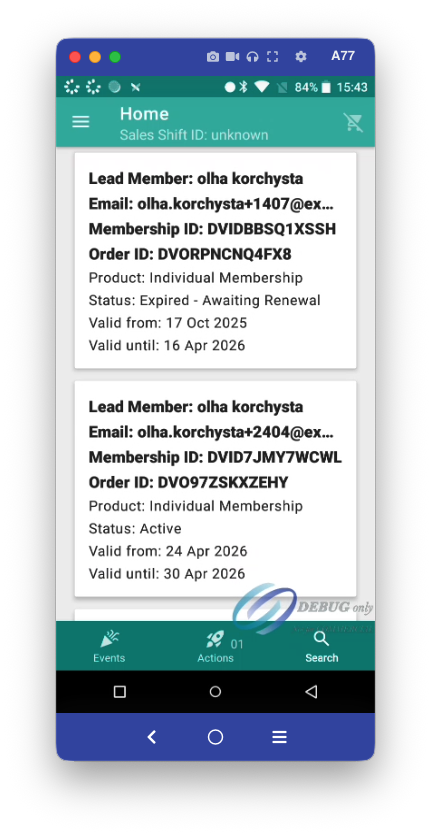
When searching by Name display the customer email address so it's easier to select the correct order
Jira: CORE-8350
- Optimize search result item layout with tighter vertical spacing (reduced margins between fields) for a more compact display.
- Improve text display consistency by applying single-line text constraints with ellipsis to customer name, booking ID, order ID, and section headers in search results.
- Apply end-ellipsis truncation to product titles to prevent layout overflow on narrow screens.
Payment still taken if cancel is pressed after final approval stage - remove cancel option
Jira: CORE-8360
Prevent unintended payment processing when cancel button is pressed during the final payment approval stage by removing user access to the cancel option on the transaction in-progress screen.
Scanning a suspended ticket should show the status regardless of sublocation
Jira: CORE-8366
Scanning a suspended ticket now correctly displays the suspended status message, regardless of the ticket's sublocation. Previously, if a suspended ticket was scanned from a different sublocation, the system would show a "Not allowed to scan in this sub-location" error instead of indicating the ticket's suspended status.
Performance improvements
Jira: CORE-8396
- Prevent memory leaks in payment and refund screens by ensuring broadcast receivers used for payment results are properly unregistered when screens or dialogs are closed. This makes navigation away from payment flows stable and reduces retained memory.
- Faster entitlement product synchronization: Product data for user entitlements now syncs more efficiently by batching network requests and database writes, reducing overall sync time.
- Improved product list rendering performance: Product group display logic has been optimized to reduce processing overhead when rendering large product lists, resulting in smoother scrolling and faster screen navigation.
!!! Known issues for V3:
- Booking options for the product don't return pricing per ticket type.
Jira: V3-66
Impact on the user: When "Check real-time availability" is turned off, the user won’t see the correct pricing for ticket types. This affects only the preview, because after proceeding to the payment screen, the cart is created and the correct pricing is retrieved. Additionally, due to this issue, the user cannot place a booking offline.

- GET /users doesn't work for POS and Scanner users.
Jira: V3-70
Impact on the user: The user logged in with username account won't be able to purchase a membership/patronage. Please, use regular (email) account for testing this functionality now.
- Search endpoint case sensative.
Jira: V3-67
Impact on the user: searching by reference using a lowercase string won't return any results. The user needs to explicitly search using an uppercase string.
Was this article helpful?
That’s Great!
Thank you for your feedback
Sorry! We couldn't be helpful
Thank you for your feedback
Feedback sent
We appreciate your effort and will try to fix the article